Quick Navigation
The Incident: When Automation Fails
Recently, a self-driving car was recorded driving onto train tracks and getting stuck. The video shows the autonomous vehicle confidently navigating what it perceived as a normal road—but what was actually a railway crossing. The vehicle treated the tracks as if they were regular driving lanes, a fundamental misunderstanding of context that could have had serious consequences.
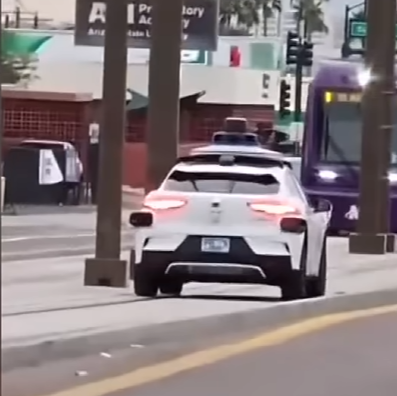
This wasn't a sensor failure or a hardware malfunction. The automation system simply couldn't distinguish between two different types of surfaces that share similar visual characteristics. To the sensors and algorithms, both were flat, paved surfaces suitable for vehicle travel. The critical difference—that one is for cars and the other is for trains—was lost.
For those of us working in PCB design automation, this incident feels uncomfortably familiar.
The Uncomfortable Parallel to PCB Autorouting
The fundamental challenge the autonomous vehicle faced—distinguishing between paths that look similar but serve critically different purposes—is exactly the challenge that has plagued PCB autorouting for decades. As we've discussed in detail in our analysis of why PCB autorouting remains broken, traditional autorouters struggle with this context problem.
The Core Problem
Just as autonomous vehicles need to understand the difference between roads, sidewalks, bike lanes, and train tracks, PCB autorouters need to understand the difference between:
- Power distribution traces versus signal traces
- High-speed differential pairs versus low-speed GPIO
- Sensitive analog signals versus noisy digital lines
- Critical clock paths versus general-purpose connections
- EMI-sensitive circuits versus robust power stages
To a basic autorouter, all of these are just "copper paths that need to connect point A to point B." The fact that routing a USB 3.0 differential pair requires completely different treatment than routing an LED control signal isn't automatically obvious to the algorithm—just as train tracks versus roads isn't automatically obvious to a vision system trained primarily on roads.
Why Context Understanding Is Hard
The Autonomous Driving Case: Visual Ambiguity
From a pure sensor perspective, train tracks and roads share significant similarities. Both are relatively flat, have defined edges, follow predictable paths, and are made of hard materials. The distinguishing features—the rails themselves, the spacing, the industrial context—require understanding what these features mean, not just detecting them.
The PCB Case: Electrical Ambiguity
Similarly, from a pure connectivity perspective, all traces in a schematic are just connections. Two pads need to be electrically connected—whether that's a 50MHz clock running across the board or a simple LED enable signal doesn't change the fundamental requirement: make a copper path.
The critical information that distinguishes these paths exists in multiple layers of context that traditional autorouters don't naturally access:
Signal Type Context
Is this a clock, data, power, ground, analog, RF, or control signal? Each category demands different routing strategies, but this information isn't inherent in the netlist—it requires understanding the schematic's design intent.
Speed and Frequency Context
A GPIO toggling at 1kHz versus an SPI bus running at 50MHz requires completely different routing approaches. Both are "digital signals" but treating them identically would be like treating a bicycle path and a highway identically because both are paved.
Electrical Requirements Context
Impedance control, length matching, via counts, layer assignment—these aren't obvious from looking at a schematic. They require understanding the electrical behavior of the circuit at the frequencies it will operate.
Design Intent Context
Which signals are absolutely critical to system function? Which are debug connections that can be routed opportunistically? This hierarchy of importance exists in the designer's mind and in design documentation, but rarely in a form that automation can parse.
Not All Paths Are Created Equal
One of the most important lessons from the incident is that treating all paths equivalently can be dangerous. Not all routes are equally safe, even if they're physically navigable.
The Hierarchy of Paths
Autonomous Driving
- Highways (high speed, controlled access)
- Surface streets (moderate speed, mixed traffic)
- Parking lots (low speed, pedestrians)
- Private driveways (restricted access)
- Train tracks (completely off-limits)
PCB Routing
- Critical high-speed paths (strict rules)
- Moderate-speed digital (controlled routing)
- Low-speed control (flexible routing)
- Power distribution (current capacity)
- Forbidden zones (keepout areas)
The problem is that automation systems—whether for vehicles or PCBs—need to be explicitly taught these hierarchies. They don't emerge naturally from the raw data.
⚠️ The Cost of Getting It Wrong
For the autonomous vehicle, the consequence was a stuck vehicle and potential safety hazard. For PCB autorouting, the consequences are:
- Failed signal integrity on critical paths
- EMI issues from improperly routed signals
- Timing violations on high-speed interfaces
- Board re-spins when issues are discovered in testing
- Production delays and increased costs
In both cases, the automation confidently executed a plan that violated critical constraints it didn't understand.
The Edge Case Problem
The incident highlights another challenge: edge cases are where automation typically fails, and they're surprisingly common in real-world applications.
In Autonomous Driving
Autonomous vehicle systems have driven millions of miles successfully. The vast majority of their driving is on normal roads under normal conditions. But train track crossings, while not common, aren't that rare either. The system encountered a scenario it wasn't properly trained to handle—or more precisely, a scenario where its training didn't capture the critical context.
In PCB Autorouting
Similarly, basic autorouters can often handle straightforward scenarios reasonably well. Simple two-layer boards with no high-speed signals and generous spacing? Many autorouters can complete those successfully. The problems emerge with:
- Mixed-signal boards where analog and digital domains must be carefully separated
- High-speed interfaces with impedance and length-matching requirements
- Dense BGAs where escape routing strategy affects the entire layout
- Multi-voltage designs with different power domain requirements
- RF sections that need ground plane continuity and careful via placement
These aren't truly "edge cases"—they're normal requirements for modern PCB design. But they represent scenarios where the automation needs to understand context that goes beyond simple point-to-point connectivity. This is one of the core reasons traditional PCB autorouting struggles with real-world designs.
Why Human Oversight Remains Essential
Neither self-driving cars nor modern PCB autorouting systems are claiming to operate entirely without human oversight. Autonomous vehicles have remote operators who can assist when needed. PCB autorouters require engineers to set up design rules and review results.
But the incident reveals something important: the human oversight model only works if the automation knows when to ask for help.
The Competence-Confidence Gap
The most dangerous automation is confident automation that doesn't understand its own limitations. The autonomous vehicle didn't stop and signal uncertainty when it encountered the train tracks. It proceeded confidently, having concluded this was a valid path.
Similarly, traditional PCB autorouters will often complete routing with apparent success, creating layouts that technically satisfy connectivity requirements but violate critical signal integrity constraints the autorouter doesn't understand.
What Good Oversight Requires
- Transparent decision-making: The system should explain why it made specific choices
- Confidence indicators: Flag areas where the automation is less certain
- Rule violation reporting: Clearly indicate when constraints are impossible to meet
- Context preservation: Maintain and communicate the reasoning behind decisions
- Reversible changes: Allow engineers to easily modify automated choices
What Better Automation Looks Like
The goal isn't to abandon automation—both autonomous vehicles and PCB design automation offer genuine benefits. The goal is to build automation that understands its own limitations and works effectively within them.
Learning from the Incident
The company will undoubtedly update their systems to better recognize and avoid train tracks. But the deeper lesson is about building systems that can handle ambiguous scenarios more gracefully:
- Better context detection and classification
- More conservative behavior in ambiguous situations
- Clearer communication with human operators
- Faster recognition when situations are outside training parameters
Applying These Lessons to PCB Automation
For PCB design automation to be truly useful, it needs similar capabilities. As outlined in our detailed discussion of what makes PCB autorouting challenging, modern automation must address these core requirements:
Context-Aware Routing
The automation should understand signal types, speeds, and requirements from the schematic and design rules—not just treat everything as generic connections. This means parsing more than netlists; it means understanding design intent.
Intelligent Constraint Recognition
Rather than requiring engineers to manually specify every constraint, better automation should recognize common patterns: "This is a USB 3.0 interface, which means these traces need 90Ω differential impedance, length matching within 0.1mm, and should avoid layer transitions."
Conservative Defaults
When uncertain, the system should err on the side of caution—wider spacing, fewer vias, more conservative layer assignments—rather than pushing boundaries it doesn't understand.
Validation, Not Just Completion
The automation should actively check its own work against known good practices and flag potential issues rather than simply declaring success when connectivity is achieved.
Interested in Context-Aware PCB Automation?
Our approach to PCB design automation emphasizes understanding design intent and working with engineer expertise, not replacing it. We focus on transparent automation that explains its decisions and flags areas needing human judgment.
Learn More Read More Technical Insights